
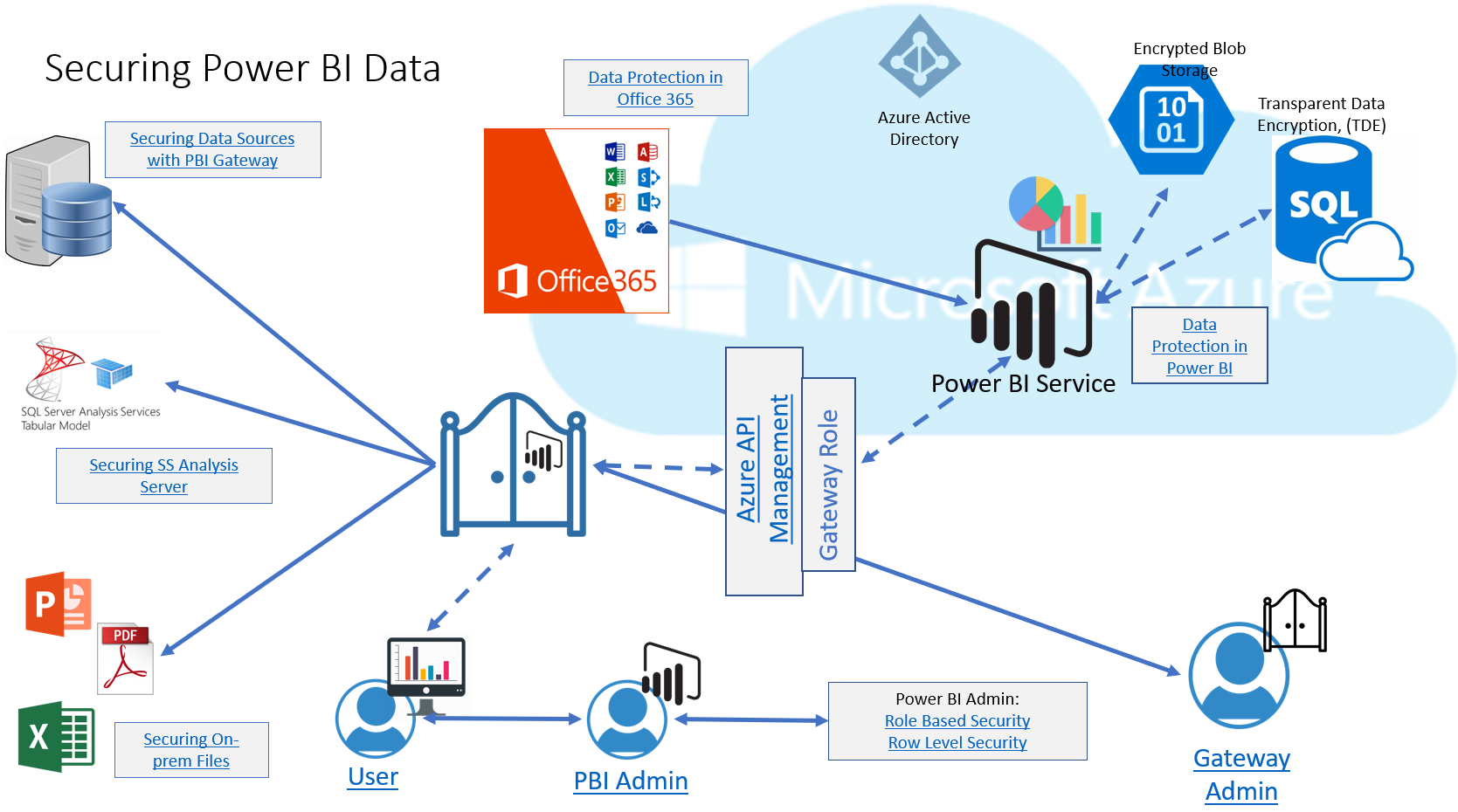
I haven’t been very good at sharing my analytics work as often I feel others are more skilled in this area than I am, just starting out, but today I’d like to start to fix that by sharing an interactive diagram. I know, some of you may be saying, “infographic”, but as it’s has links vs. a paginated design, I’ll call it as I see it. Not the Kitchen Sink This diagram I built for a customer who was interested in how data was secured at different stages of the Power BI environment and was built with their specific Power…
-
-
This last week, I presented a few sessions at ODTUG’s KSCOPE 2019 conference in Seattle. One of these sessions was with my wonderful co-presenter and Oracle Application Cloud expert, Opal Alapat. I connected with her when the call for papers opened and asked her if there would be interest in doing a session with Power BI connect to the Essbase in the Oracle Applications cloud, (OAC). There was no desire to do a bake-off or competitive session, just a morbid curiosity about what options there were to connect the two and the outcome of building reports out of valuable data…
-
There are busy times for everyone and if you speak at conferences, the busy times are March,May and November. I am recovering from the early spring rush, and now it’s time to prepare for the late spring one. I’ve been fortunate enough to be accepted to speak at the following regional SQL Saturdays and look forward to speaking and meeting new folks, along with catching up with conference friends: SQL Saturday Raleigh, April 27th Optimizing Power BI, Taming of the Shrew, (Analytics) SQL Saturday Jacksonville, May 5th GDPR, The Buck Stops Here, (data governance) Be a Part of the Solution…
-
So Tracy Boggiano told me about the great First Responder kit that Brent Ozar had available to use with sp_Blitz using Power BI desktop for a UI, but that it was really slow to non-responsive as data grew. As this was focused on performance data and also included my new love of Power BI, I asked to take a look at it. Tracy was kind enough to send me a copy of her database and the support files for the responder kit and I finally had time to look into it this week. We won’t discuss how I managed to…
-
I just finished cleaning up the example data that I was offered for my own demos and solutions. Working in Education requires you use education data to ensure what you’re presenting resonates with the users you’re working with. Otherwise you just look silly presenting something that makes utterly no sense to the individual you’re hoping to impress. Having been given the gift a large data set from demos and solutions, I quickly took the data in its original form and attempted to use it, “as is” in Power BI. After a less than stellar demonstration, set off by bizarre results…
-
There’s a reason that log analytics programs, like Splunk, Data Dog and Sumo Logic are so popular. Even Microsoft has a Log Analytics product, but the important message here is log data is massive and parsing through it to find important information can be a bit of a pain. The second word in Log Analytics IS “analytics”. Due to this, the first thought when faced with the number of logs from many complex Power BI environments that people are building, (multiple data sources, multiple data centers, SSRS, Power BI, etc) was to load the logs into Power BI. I’ve been…
-
Power BI, like many Microsoft products, is multi-threaded. This can be seen from the logs and even the Task Manager. I know, I know…you’ve probably heard this part all before… The importance of this information, is that the logs will display Process IDs, (PID) that are separate from the main Power BI Desktop executable, including the secondary processes.. Moving from the Power BI logs that reside in the Performance folder, (see Part I here) we can view and connect the PIDs and TID, (Transaction IDs) to information from the Task Manager and the data displayed: Note that I’ve highlighted the…
-
So we went over locations and the basics of logging and tracing in Power BI. I now want to know how to make more sense from the data. In Oracle, we use a utility called TKProf, (along with others and a number of third party tools) to make sense of what comes from the logs. SQL Server has Log Analytics and the profiler, but what can I do with Power BI? First, let’s discuss what happens when we have actual activity. In my first post, the system was pretty static. This time I chose to open up a file with…
-
They say the devil is in the details and as I come from the DevOps side of the house, it would only be natural that I’d be attracted to how Microsoft Flow works with Power BI. For those that aren’t familiar with Microsoft Flow, think of it like If This Then That, (IFTTT) from Microsoft. I used IFTTT to automate a number of tasks at my previous company- everything from posting to social media automation, notifications on Slack, creating weekly status reports and other tedious tasks that I hated having to do manually. Microsoft Flow, is a powerful SaaS tool…
-
I’m back!! I know you missed my posts…be honest…. 🙂 So its time to start drinking from the fire hose and its important for me to go back to the very beginning, start from scratch and learn from A to Z. I learned Power BI on my own and there is undoubtedly pieces missing from my knowledge base that need to be filled in. No way I’d be able to spell if my A to Z alphabet was missing some vital letters, right pps, err, I mean peeps? What is Power BI? Power BI is Microsoft’s answer to how people…